Read Code
- follow sensor data flow
- focus on sensor type,driver,data processing,ros topic
1.GNNS sensing>drivers>GNNS
1.1 driver basic
ROS driver to parse NMEA strings and publish standard ROS NavSat message types. Does not require the GPSD daemon to be running. http://wiki.ros.org/nmea_navsat_driver
Supported GPS Devices: http://wiki.ros.org/nmea_navsat_driver/SupportedHardware
| Venus | Venus634LPx | Yes | GGA, GSA, RMC | SBAS | works |
|---|---|---|---|---|---|
| Garmin | GPS 18x | Yes | GGA, GSA, RMC | SBAS | works |
1.2 node and topic ,data flow
- nmea_topic_serial_reader :
Reads NMEA sentences from the specified serial port and publishes them to a ROS topic.
Published Topics:
    nmea_sentence (nmea_msgs/Sentence) :
        A single time-stamped NMEA sentence captured from the serial device
Parameters:
    port (string, default: /dev/ttyUSB0)
        The device path

    baud (int, default: 4800)
        The baud rate to receive NMEA data.

    frame_id (string, default: gps)
        The frame_id for the header of the nmea_msgs/Sentence and output message.
        Will be resolved with tf_prefix if defined.
- nmea_serial_driver: NMEA GPS Serial driver node.
NMEA GPS Serial driver node.
Published Topics:
    fix (sensor_msgs/NavSatFix)
        GPS position fix reported by the device.
        This will be published with whatever positional and status data was available
        even if the device doesn't have a valid fix. Invalid fields may contain NaNs.

    vel (geometry_msgs/TwistStamped)
        Velocity output from the GPS device.
        Only published when the device outputs  valid velocity information.
        The driver does not calculate the velocity based on only position fixes.

    time_reference (sensor_msgs/TimeReference)
        The timestamp from the GPS device is used as the time_ref.

Parameters:
    ~port (string, default: /dev/ttyUSB0)
        The device path

    ~baud (int, default: 4800)
        The baud rate to receive NMEA data.

    ~frame_id (string, default: gps)
        The frame_id for the header of the sensor_msgs/NavSatFix and geometry_msgs/TwistStamped output messages.
        Will be resolved with tf_prefix if defined.

    ~time_ref_source (string, default: <the value of ~frame_id>)
        The value to use as the source in the sensor_msgs/TimeReference.

    ~useRMC (bool, default: False)
        Whether to generate position fixes from GGA sentences or RMC sentences.
- nmea_topic_driver
NMEA GPS Topic driver node. Reads NMEA sentences from a ROS topic instead of directly from e.g. a serial port.
Subscribed Topics
    nmea_sentence (nmea_msgs/Sentence)
        NMEA sentences, 1 per message.
        These sentences do not have to be checksummed or otherwise validated before reaching the driver.
Published Topics:
    fix (sensor_msgs/NavSatFix)
        GPS position fix reported by the device.
        This will be published with whatever positional and status data was available even if the device doesn't have a valid fix.
         Invalid fields may contain NaNs.

    vel (geometry_msgs/TwistStamped)
        Velocity output from the GPS device. Only published when the device outputs valid velocity information.
        The driver does not calculate the velocity based on only position fixes.

    time_reference (sensor_msgs/TimeReference)
        The timestamp from the GPS device is used as the time_ref.
1.3 into code
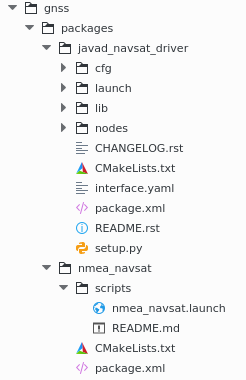
nmea_navsat is just source file fork from github.useless.
dive into javad_navsat_driver :
1.3.1 lauch file
<launch>

  <arg name="port" default="/dev/ttyUSB0"/>
  <arg name="baud" default="57600" />
  <arg name="enable_file" default="$(find javad_navsat_driver)/cfg/enable.cfg"/>
  <arg name="disable_file" default="$(find javad_navsat_driver)/cfg/disable.cfg"/>

  <!-- HOW TO RUN using rosrun:-->
  <!-- rosrun nmea_navsat_driver nmea_topic_serial_driver _port:=/dev/ttyUSB0 _baud:=57600 -->
 <!-- rosrun nmea_navsat_driver nmea_topic_driver -->

<!--read sentence and publish topic-->
<node pkg="javad_navsat_driver" type="javad_topic_serial_reader" name="javad_topic_serial_reader" output="log">
  <param name="port" value="$(arg port)" />
  <param name="baud" value="$(arg baud)" />
  <param name="enable_file" value="$(arg enable_file)" />
  <param name="disable_file" value="$(arg disable_file)" />
</node>

<!--subscribe topic-->
<node pkg="javad_navsat_driver" type="javad_topic_driver" name="javad_topic_driver">
</node>

</launch>
start two nodes: javad_topic_serial_reader and javad_topic_driver
set Parameters :port,baud
1.3.2 javad_topic_serial_reader
read GPS data from device via serial ,and publish topic "nmea_sentence"
1.3.3javad_topic_driver
Subscriber "nmea_sentence", check sum to verify validation of sentence,
publish current_vel,current_fix,current_time_ref
2.can sensing>drivers>GNNS
2.1 driver basic
kvaser is a software product from KVASER that provides support for different CAN interface boards.
http://www.kvaser.com/canlib-webhelp/page_user_guide_intro_what.html
must install CANlib first ,then you can build this package!!!
support device:
https://www.kvaser.com/product/kvaser-leaf-light-hs-v2-obdii/
The Leaf Light v2 OBDII provides a simple way of connecting a PC with a vehicle’s on-board computer by means of USB 2.0 connector and a 16-pin OBDII-compliant CAN connector. Having made its name as the work-horse of USB to CAN interfaces, Kvaser's Leaf Light product series provides reliable, low cost tools for connecting any CAN network to a PC or mobile computer in vehicle diagnostic applications and beyond.
2.2 into package

2.2.1 msg
only use CANPacket.msg
2.2.2can_listener
set communication parameter with kvaser device,
read can data and publish "can_raw"
2.2.3 can_converter
subscribe "can_raw",convert to real value ,save to log /tmp/can_log
2.2.4 can_draw
subscribe "can_raw",convert to real value ,save to log /tmp/can_log,
publish "can_status",type Marker, ?????
    line_list.header.frame_id = "velodyne";
    line_list.header.stamp = ros::Time::now();
    line_list.ns = "steer_speed";
    line_list.action = visualization_msgs::Marker::ADD;
    line_list.pose.orientation.w = 1.0;
    //  line_list.lifetime=ros::Duration(0.2);

    line_list.id = 0;
    line_list.type = visualization_msgs::Marker::LINE_LIST;
    line_list.scale.x = 0.2;
    line_list.color.r = 1.0;
    line_list.color.g = 0.0;
    line_list.color.b = 0.0;
    line_list.color.a = 1;
3. camera sensing>drivers>camera
3.1 support camera
3.1.1 VLG-22C.I
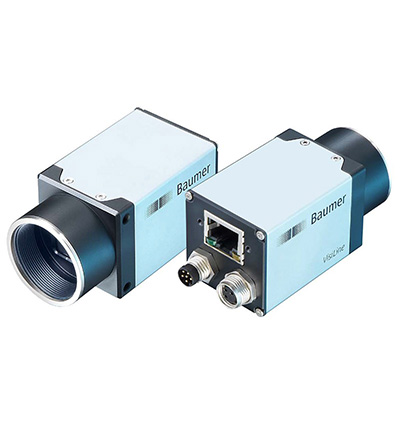
| VLG-22C.I | - |
|---|---|
| Camera Series: | VisiLine |
| FPS: | 55 |
| Interface: | GigE |
| Manufacturer: | Baumer |
| Resolutions: | 2.2 MP |
| Scanning Mode: | - |
| Signal System: | Digital Color |
camera drive :BaumerGAPI
lauch file
<launch>
    <!-- declare arguments with default values -->
    <arg name="fps" default="15"/>
    <arg name="CalibrationFile" default=""/>

    <node pkg="vlg22c_cam" type="vlg22c_cam_node" name="vlg22c" cwd="node">
        <param name="fps" value="$(arg fps)"/>
        <param name="calibrationfile" value="$(arg CalibrationFile)"/>
    </node>
</launch>
set parameter fps,CalibrationFile

start node :vlg22c_cam_node
initilize camera system,get device info eg.camera number,system number
publish "image_raw1", "image_raw2"....
3.2HexaCam
maybe http://www.hexacam.com/ptzcameras.htm
ros node can read image data via socket.
send data to camera device to configure and enable camera,
get image data stream from camera , process stream data to image msg type,
publish topic ,"camera0/image_raw","camera1/image_raw"
3.3 grasshopper3
https://www.ptgrey.com/grasshopper3-usb3-vision-cameras

Grasshopper®3 相机系列将最新的 CCD 和 CMOS 技术与 FLIR 的专门技术相结合,实现了高性能、高质量的成像。
Grasshopper3 系列采用多抽头 Sony EXview HAD CCD II™ 传感器和 Sony Pregius™ 全局快门 CMOS,
并带有对科学应用至关重要的独特低噪声成像模式。此系列相机支持使用以太网供电的 USB 3.1 和 GigE,
是众多对成像质量有严格要求的应用的理想选择,包括平板检测、3D 测量、眼科、动态血流观测和荧光成像等。
lady_bug
https://www.ptgrey.com/360-degree-spherical-camera-systems

360° 型相机成像系统有何特别之处?

功能丰富
Ladybug 球型系统提供 360° 视频串流功能,能够覆盖 90% 的可视球面。该系统已进行预校准,易于使用,并具有图像采集、处理、拼接和校正功能,以便实时制作全分辨率的数码球型和全景视频。

省时且具图像增强功能
Ladybug5 独有的后期处理工作流程通过将图像处理操作从相机转移到主 PC 中,实现最大动态范围和用户灵活性。用户可以在后期选择并尝试各种设置,并且可以观看实时效果,无需重新录制。

几何校准与精确性
Ladybug 系统并非仅依靠机械校准,它还可通过软件对各个相机进行单独校准,然后再与另外五个相机进行一一比对校准。该系统能够识别与每个相机的每个像素有关的矢量,精确度高达百分之一度。
read image data via usb ,and publish topic ,"camera0/image_raw","camera1/image_raw"
3.4vectacam
read image data via socket,publish topic ,"camera0/image_raw","camera1/image_raw"
4.imu
- memsic imu vg440

http://www.memsic.com/inertial-systems/
- xsens mtdevice
http://wiki.ros.org/xsens_driver
read imu data via serial ,tranform to ros imu msg type ,publish topic "/imu_raw"